


 28542
28542
Canvas has a simple and streamlined approach to entering content anywhere the Rich Content Editor (RCE) is available. This includes Announcements, Assignments, Discussions, Pages, and Quizzes. The RCE is capable of embedding any YouTube or Kaltura videos, images, other media files, course files, and math formulas. You can also create tables, lists, hyperlinks, and remove formatting that carried over when you copy/pasted content from another application.
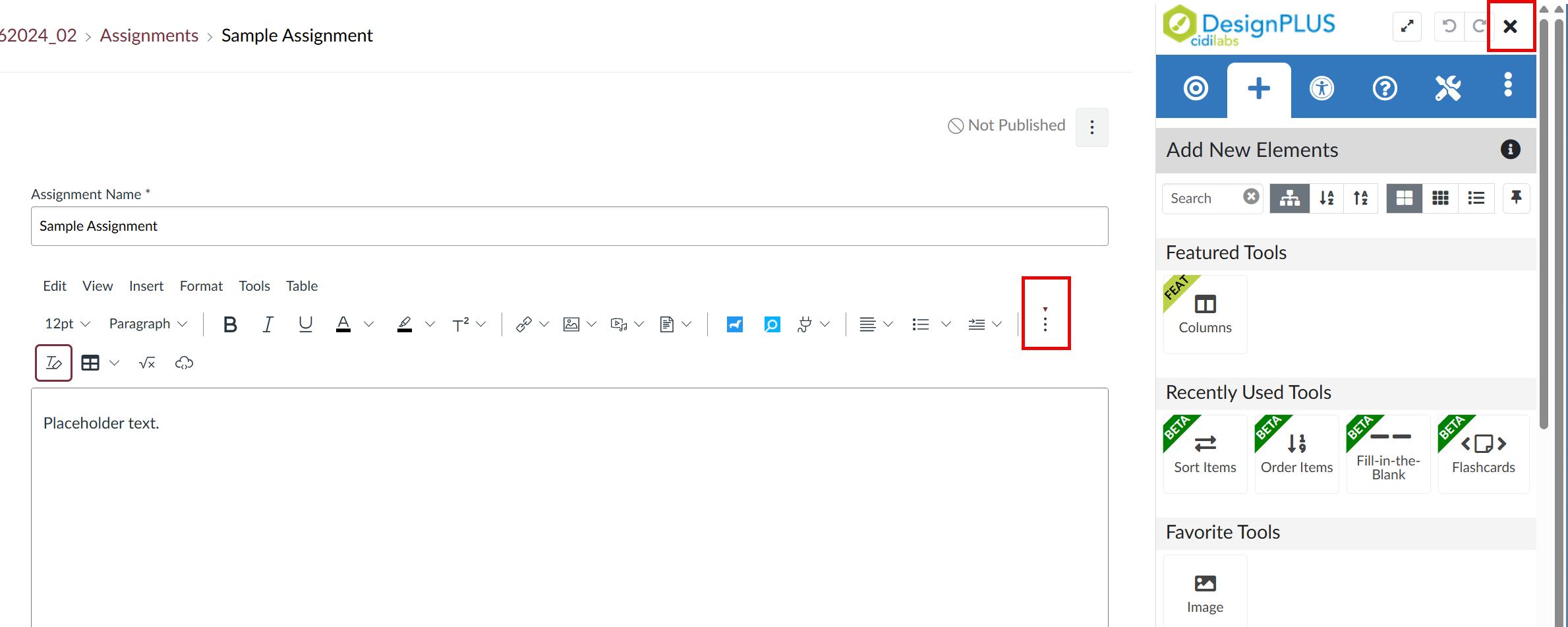
Note: If the DesignPLUS menu automatically opens for you when you use the RCE, you may not see all of its buttons as easily.
To access all the RCE's functions you will need to click the three stacked dots just above the text box. If you are not using DesignPLUS, then you can close out its menu by clicking the X in the upper right corner of the screen to expand the RCE's button visibility.
Further Resources
- General items & text formatting
- Media
- How do I upload and embed an image in the Rich Content Editor?
- How do I embed Kaltura videos in the Rich Content Editor?
- How do I upload and embed a media file from my computer in the Rich Content Editor?
- How do I embed images from Canvas into the Rich Content Editor?
- How do I manage alt text and display options for images embedded in the Rich Content Editor?
- How do I link to a YouTube video in the Rich Content Editor?
- Hyperlinks & documents











