


Select an Online Proctor for eligible exams

Last updated: Apr 30, 2026
2835
views

FSU students can choose an online proctor for individual eligible exams, but not as a default proctor. After you select an in-person proctor as your default, you will have the opportunity to change your individual exam selections for eligible exams.
Proctor Selection Steps
- Please log in to your Proctor Selection page and choose an in-person proctor as your default.
-
After the default is set up, the page will reload, and you will see each of
your FSU Testing Center-managed distance exams listed in the
Selected Proctor Table.
-
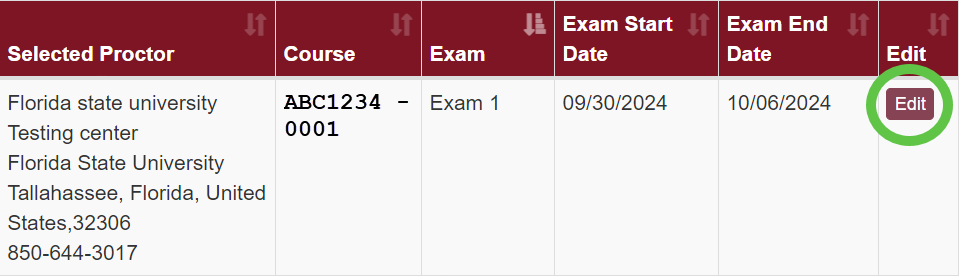
In each row, you will see the proctor currently set, the course number,
the exam name, the exam window, and an Edit button.
-
In each row, you will see the proctor currently set, the course number,
the exam name, the exam window, and an Edit button.
-
Select the Edit button in the right-most column, and a window will appear
with options to change your proctor selection.
-
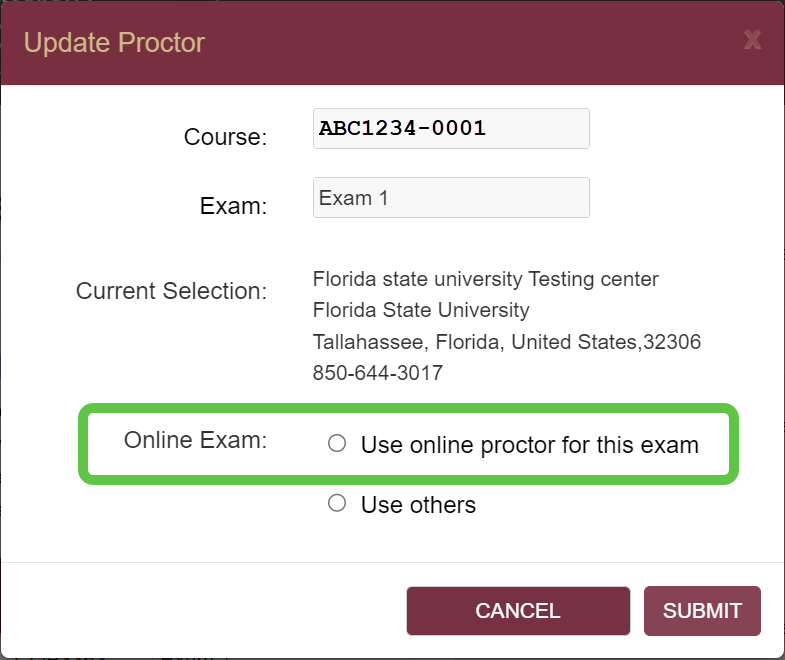
Eligible exams will have an option to "use online proctor for this
exam".
-
Eligible exams will have an option to "use online proctor for this
exam".
Who is your online proctor?
It is important to carefully review each course syllabus for information about which online proctor is being used in the course. Your Proctor Selection page will not indicate which online proctor option your instructor has selected for your course.
SmarterProctoring
Students who are taking courses that use SmarterProctoring's Live Online Proctor service should review the Testing Online with SmarterProctoring webpage for important information.











